


"Bandwidth" requires further definition. | ||||||||||
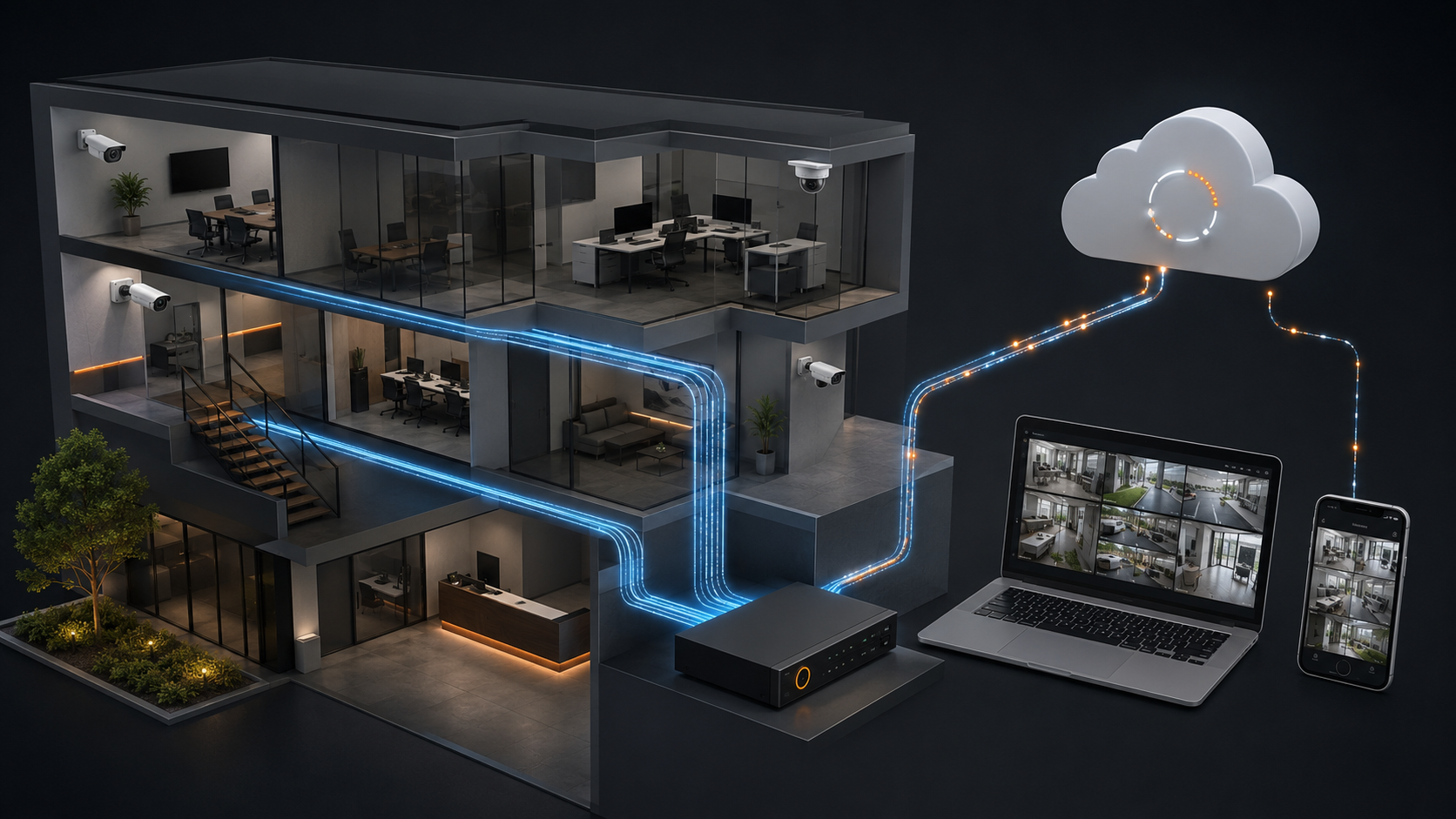
A camera recording to itself or to an NVR or server at the same location primarily uses the local network. Internet bandwidth is consumed when video or data leaves the site—for remote viewing, cloud backup, video sharing, management or other cloud-connected services. Understanding this difference is essential when designing a system that delivers reliable video without disrupting other business operations. What Determines Camera Bandwidth?Every video stream has a bitrate—the amount of data it transmits per second. Several factors affect that bitrate. ResolutionHigher-resolution video generally requires more bandwidth because each frame contains more visual information.
A 4K camera can require several times the bandwidth of a 1080p camera, although compression and other settings can narrow that difference. Frame RateFrame rate measures how many images a camera captures each second. Video recorded at 30 frames per second requires more bandwidth than video recorded at 10 or 15 FPS. Higher frame rates may be valuable when monitoring fast-moving subjects, but many everyday surveillance applications work effectively at 15 FPS or less. The right setting depends on the scene and the evidence the system must capture. Video CompressionCompression reduces the amount of data required to transmit and store video. Common technologies include:
More efficient compression can substantially lower bandwidth and storage requirements while preserving useful image quality. Results will vary with the camera, scene and configuration. Scene ActivityA camera does not necessarily use the same amount of bandwidth all day. An empty hallway usually produces less data than a crowded entrance or busy parking lot. Movement, changing lighting, rain, trees and other visual activity can all increase the amount of information that must be encoded. Recording Mode and ArchitectureBandwidth requirements are also affected by whether the system:
These architectural choices can have a greater impact than any single camera specification. Local RecordingWith local recording, video may be stored directly on the camera or sent across the facility’s network to an NVR or recording server. This traffic must be included in local network planning, but it places relatively little demand on the organization’s internet connection during normal recording. Internet bandwidth is primarily used when someone accesses the system remotely or when video and system information are shared with cloud services. Local recording also allows the system to continue capturing video if the internet connection becomes unavailable, provided the cameras, recorder and local network remain operational. Cloud-Connected Recording“Cloud recording” can describe several different architectures. Some systems continuously upload camera streams to cloud storage. This can require substantial and consistent internet upload capacity, especially when many high-resolution cameras are involved. Other systems record video locally—on the camera, an NVR or a server—and use the cloud for:
In these systems, video or data may be transmitted selectively or progressively rather than sending every full-resolution camera stream to the cloud continuously. This hybrid approach can reduce internet bandwidth requirements while preserving local recording reliability and the benefits of cloud connectivity. Bandwidth planning should therefore consider not only whether a system is described as “cloud-connected,” but exactly what is transmitted, how often it is sent and where the primary recording is stored. Remote Viewing Also Uses BandwidthEven when video is recorded locally, remote access consumes internet bandwidth whenever someone views or downloads footage. Demand increases when:
Modern video management platforms can help by using dual streams or adaptive streaming. The system can provide a lower-bandwidth stream for routine viewing while preserving a higher-quality stream for recording and investigation. Do Video Analytics Use Internet Bandwidth?The answer depends on where the analytics are processed. If analytics operate on the camera or an on-site server, the video may not need to be transmitted to the cloud for analysis. Only event information, metadata, notifications or relevant video clips may need to leave the site. Cloud-based analytics may require more data to be uploaded, depending on whether the service processes complete video streams, selected footage or event-based content. Edge and server-based processing can therefore help organizations gain the benefits of AI while controlling internet bandwidth use. Planning for Multiple LocationsBandwidth becomes more important as organizations expand across multiple sites. Centralized monitoring, cloud management, health reporting and video sharing can generate traffic across every location. A scalable design should evaluate more than total camera count. It should consider:
Upload speed is especially important. An internet plan may advertise a high download speed while providing substantially less upload capacity. How to Reduce Bandwidth UseOrganizations can control bandwidth without sacrificing the video that matters most. Use efficient compressionConfigure modern codecs and smart compression appropriately for each scene. A loading dock or traffic lane may need a different frame rate than a quiet hallway. Use event-based recording where appropriateMotion- or analytics-triggered recording can reduce unnecessary video transmission and storage. Configure dual streamsRecord at high quality while using a lower-bandwidth stream for routine remote viewing. Process events at the edgeCameras with onboard analytics can identify relevant activity close to where video is captured. This can reduce the need to transmit every stream to the cloud for analysis. Keep primary recording local when appropriateRecording on the camera, NVR or server can preserve video quality and reliability without requiring continuous internet transmission. Preserve capacity for growthAvoid designing a network that operates at its limit. Additional capacity helps accommodate activity spikes, new cameras and future cloud-connected services. How Digital Watchdog Can HelpDigital Watchdog offers the components needed to build an efficient, scalable hybrid video surveillance system, including:
By combining local recording with intelligent edge processing and cloud-connected capabilities, organizations can maintain high-quality video and operational visibility without sending every camera stream continuously over the internet. The real question is not simply, “How much bandwidth does a camera use?” It is, “How should the complete surveillance system be designed?” The right architecture balances image quality, recording reliability, remote accessibility, network capacity and future scalability. |
||||||||||